


na* mu****** 
good service from cs team
07.06.2025Ready to officially join your favorite streamer’s community on the world’s biggest live streaming platform? A Twitch Subscription is more than just a way to support your favorite creator; it’s a symbol of belonging, a gateway to exclusive perks, and the most direct way to say “I’m with you!” in the digital world.
Subscribing to a channel means you provide monthly support to the streamer and unlock special benefits in return. Following is free, but subscribing makes you a true “V.I.P.” in that community.
When you subscribe to a channel (regardless of Tier 1, 2, or 3), you get these standard benefits:
Custom Emotes: Unique, channel-specific emotes you can use across all of Twitch. The best way to make your chat stand out!
Loyalty Badges: Cool icons that appear next to your name and evolve the longer you stay subscribed.
Ad-Free Viewing: If enabled by the streamer, you can watch streams on that channel without any ad interruptions.
Sub-Only Chat: When chat is restricted to subscribers only, you can keep interacting and sharing your thoughts.
Subscriber-Only Streams & VODs: Access to exclusive streams and past broadcasts available only to subscribers.
On Twitch, your support level is reflected in three different tiers:
| Tier | General Features | Extra Perks |
| Tier 1 | Standard Support | Basic emotes and badge. |
| Tier 2 | Enhanced Support | Includes everything from Tier 1, plus one exclusive emote and customizable badge effects. |
| Tier 3 | Legendary Support | Everything from Tiers 1 & 2, plus two rarest emotes and a special status. |
One of the most beloved features of the Twitch community is the Gift Sub system. While watching a streamer, you can gift a subscription to another user in the chat (or even someone who’s not there at the moment). This helps the community grow and can trigger big celebrations in chat (like a “Hype Train”).
If you’re an Amazon Prime member, you get one free subscription each month. This benefit renews every month, but it doesn’t continue automatically; you need to manually subscribe to your favorite streamer with Prime each month.
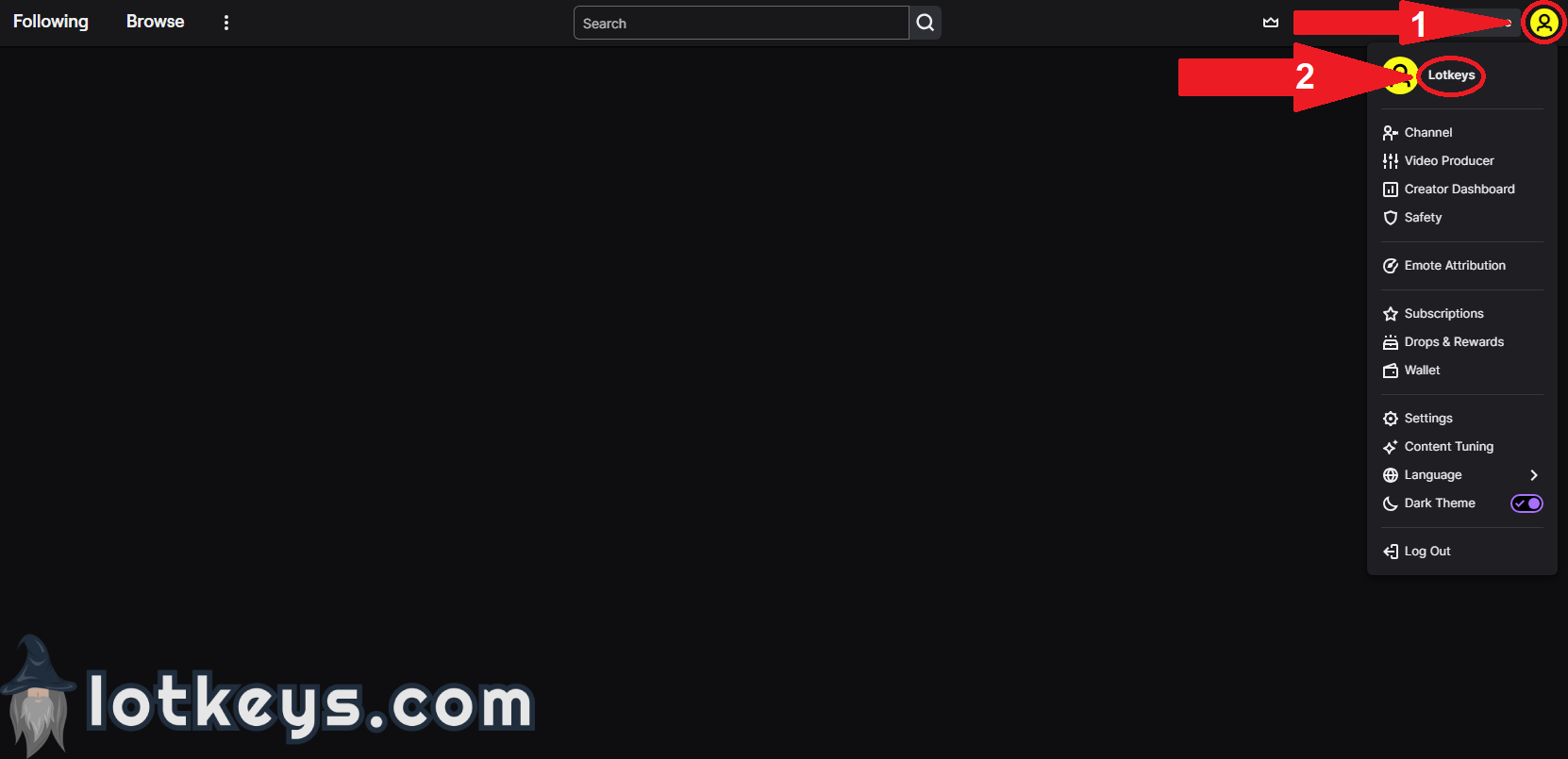
How Can I Find My Twitch Username?
1. Go to twitch.tv, then click on the profile icon in the top right corner, and your username will appear on the screen.
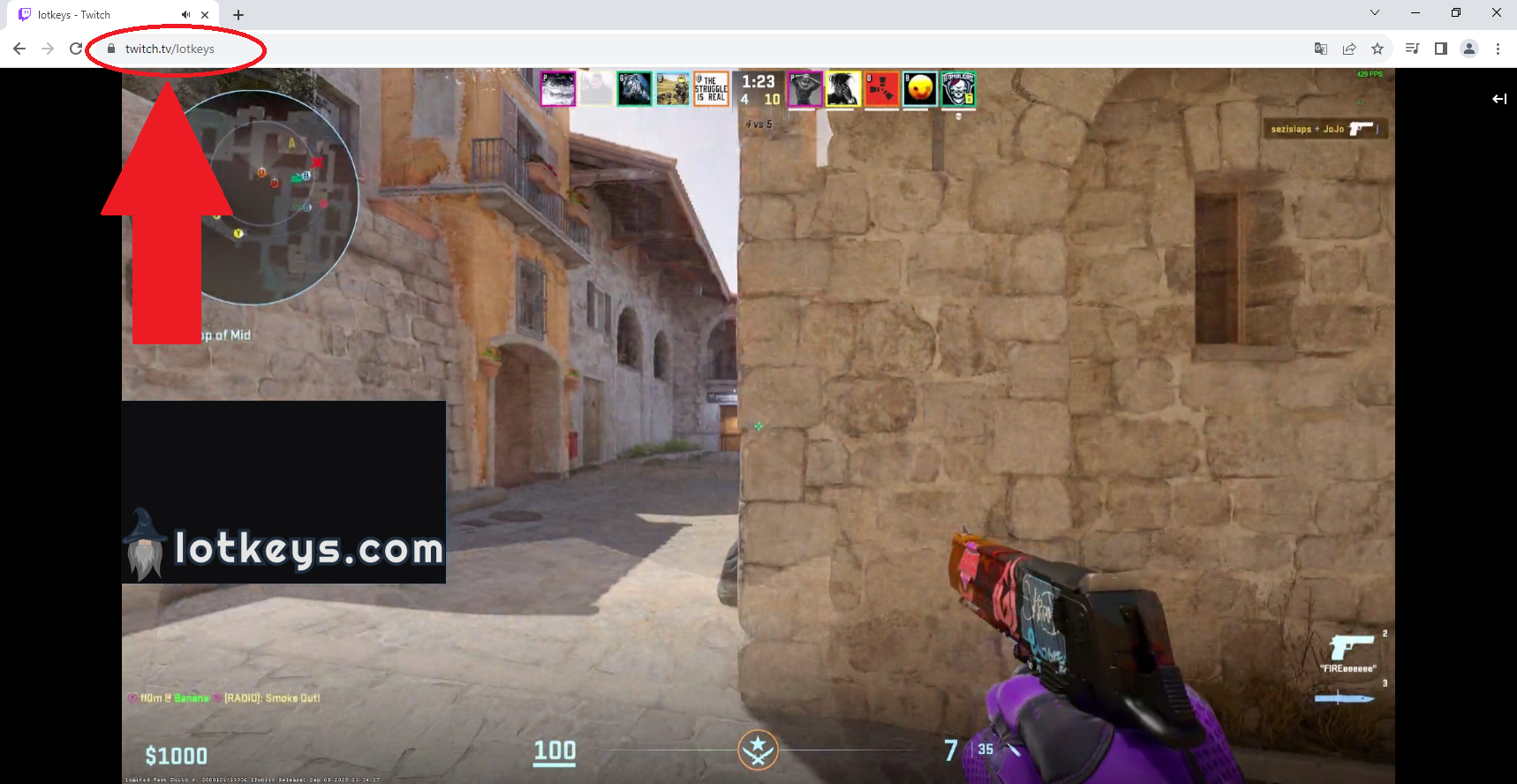
How Can I Find a Twitch Streamer's Profile Link?
1. Go to the channel of the streamer you want to subscribe to. You will see the streamer's profile link in the top browser bar.

good service from cs team
07.06.2025
fast response from lotkeys cs team
04.08.2025
Perfect, easy & fast Service! Thanks!????✌️
30.11.2025
finally I was able to sub on my country without personal hands!
02.12.2025
Mega fast! Everything okay
02.12.2025
It was weird to give card detail but its ok
04.02.2026
CS very helpful.
06.03.2026
good service from cs team????????????????
08.07.2025
had small issue but support fixed my issue 10/10 service
05.02.2026
That was really fast I like it thanks guys
23.03.2026
highly recommended
12.11.2025
was very quick, thanks you
02.12.2025
thanks for your service!
02.12.2025Products from authorized providers at fair prices.
24-Hour Nonstop and Fast Delivery Service.
24/7 Support Center
100% Satisfaction Guaranteed






Twitch Subscription (Global) Comments
%100
Positive Comments