


Secure Shopping
Products from authorized providers at fair prices.
The latest addition to the Counter-Strike series, Counter-Strike 2, or simply CS2, has made its way into the gaming world. In this article, we will guide you step by step on how to display FPS in CS2
Valve released the latest game in the Counter-Strike series, Counter-Strike 2 (CS2), in 2023, and it received significant attention in the gaming community. However, many players are wondering how to view the game's FPS (Frames Per Second) values. In this article, we will explain the methods to display FPS in CS2 step by step, allowing you to enjoy a better gaming experience.
There are two different methods to view FPS values in the Counter-Strike 2 (CS2) game. The first method involves using the in-game developer console, while the second method allows you to configure it through the Steam interface. Now, let's explain the process of displaying FPS in CS2 using both methods in detail.
Method 1: Displaying FPS in CS2 Using the Developer Console
If you want to see how many FPS you are getting in CS2, you can do so by using the developer console. Here's how to do it step by step:
Step 1: Launch CS2.
Step 2: Click on the "Settings" icon in the top menu.
Step 3: Go to the "Game" tab.
Step 4: Set the "Enable Developer Console" option to "YES."
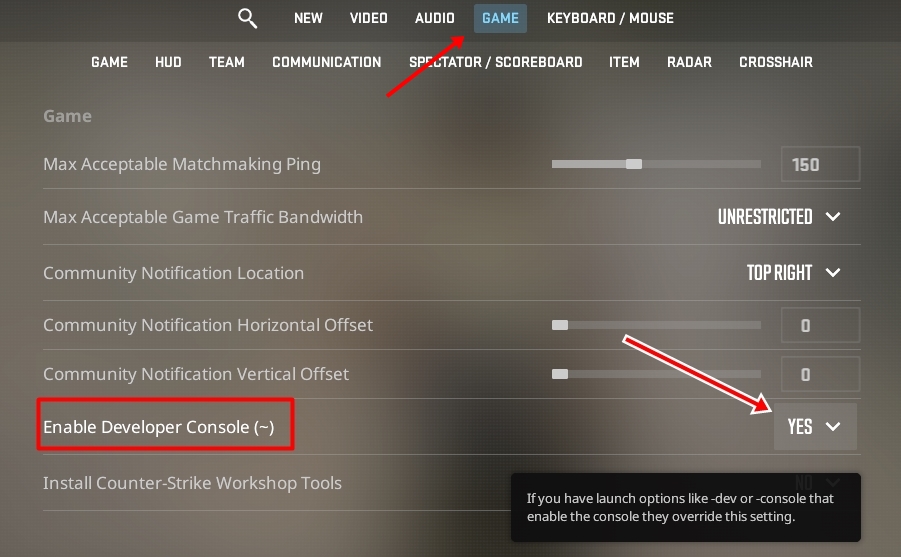
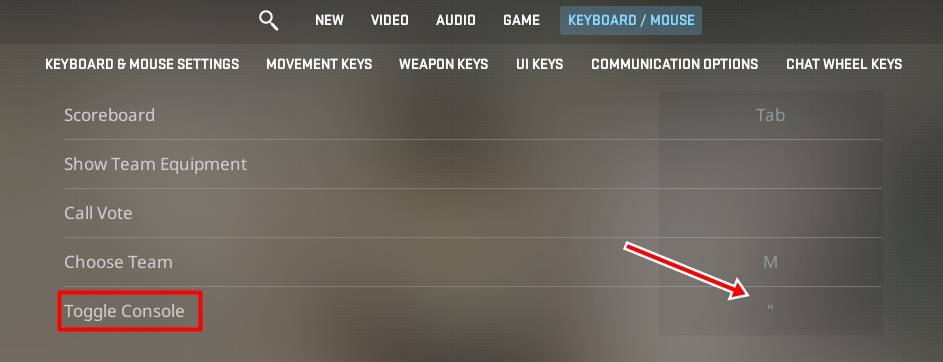
Step 5: Switch to the "Keyboard/Mouse" tab.
Step 6: Assign a key to the "Toggle Console On/Off" function.
Once you have enabled the developer console, follow these steps:
Step 7: Press the assigned key to open or close the developer console.
Step 8: When the developer console is open, type the command "cl_showfps 1" into the text box.
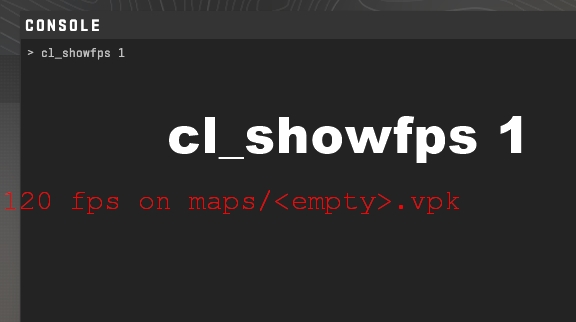
Step 9: You will now see the FPS value show on the screen.
.
Method 2: Show CS2 FPS Through the Steam Interface
Another method to see the FPS value in CS2 is to use the Steam interface. Here's how to apply this method step by step:
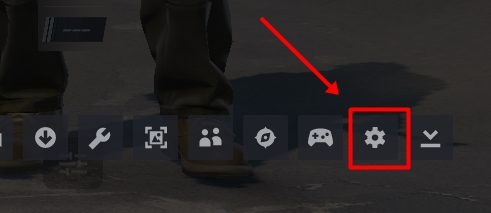
Step 1: While the game is open, press "Shift + TAB" simultaneously to open the Steam overlay.
Step 2: Click on the "Settings" icon.
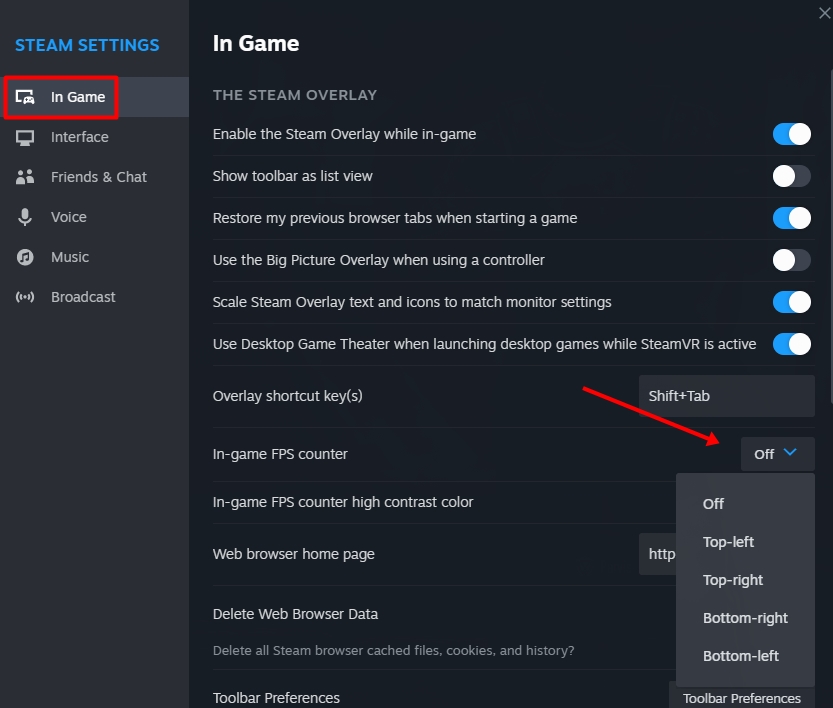
Step 3: In the opened Settings window, navigate to the "In-Game" section
Step 4: Choose the position where you want to display the FPS value in the "In-Game FPS Counter" section.
if you want to check your FPS while playing Counter-Strike 2, you can use one of the two methods mentioned above. This guide will help you with show FPS in CS2. The Lotkeys team is here to assist you in enhancing your gaming experience.
 BlizzCon 2026 Opening Ceremony: Start Time, How to Watch, and What to Expect
BlizzCon 2026 kicks off with its Opening Ceremony on September 12 at 10:30 AM PDT, lasting around 75 minutes. Major announcements for Warcraft, Diablo, StarCraft, and Overwatch are expected.
 Is PlayStation Facing Its Darkest Days Yet?
From the collapse of Concord to Kojima’s Xbox move and ongoing live service failures, PlayStation finds itself redefining its identity amid delays in single-player projects.
 Amazon Prime Members Get Doom Eternal and 10 More Free Games This September
Get 11 free PC games in four weekly drops this September. Standout titles include Doom Eternal, High on Life, and Doom + Doom II.
 Drift Attack Arrives Permanently in Forza Horizon 6: All You Need to Know
With the British Automotive update, Forza Horizon 6 introduces the permanent Drift Attack mode at Shimanoyama Circuit. Discover the scoring system, reward car, and top car picks.
 Nintendo Switch 2 Update 23.0.0 Brings VRR Support and Major New Features
Nintendo has rolled out a major update for Switch 2, introducing VRR support in TV mode, full system transfer, and new music for Mii Maker.
 Unofficial Global GTA 6 Release Times Revealed
According to PlayStation Store listings, GTA 6 will launch in 15 separate regional windows over 19 hours, not all at once. New Zealand gets first access, while the US and Canada are among the last.
Products from authorized providers at fair prices.
24-Hour Nonstop and Fast Delivery Service.
24/7 Support Center
100% Satisfaction Guaranteed