







Secure Shopping
Products from authorized providers at fair prices.
Are you ready to push the boundaries of the sky and explore the world in breathtaking detail? Microsoft Flight Simulator 2024 delivers the most authentic civil aviation experience ever. Simverse Coins are the only official in-game currency you need to build your own fleet, upgrade airports, and customize your signature in the sky.
Valid in the massive "Marketplace" of Flight Simulator 2024, Simverse Coins take your simulation adventure to the next level. Don’t just fly expand your collection with rare aircraft and enjoy the privilege of landing at the world’s most exotic airports.


Next-Gen Aircraft: From historic planes to the most modern passenger jets, helicopters, and gliders expand your hangar with a vast selection.
Enhanced Airports: Add-ons that bring the world’s most iconic airports to life with authentic buildings and detailed runways.
Exclusive Liveries: Give your aircraft the colors of world-famous airlines or design your own unique look.
Detailed City Packs: Visual enhancements that make city landmarks and vegetation more realistic than ever.
Seamless Xbox Integration: Activate directly via Microsoft Store and start using instantly on your Xbox Series X|S console.
Marketplace Convenience: Access thousands of add-ons securely with a single click no need to leave your game.
Cloud Sync: Content purchased on your Xbox account stays with you across other compatible platforms linked to your Microsoft account, thanks to cross-buy support.
Fast & Secure: Instantly receive your 25-digit digital code from Lotkeys.com and jump into the skies without delay.


| Feature | Details |
| Platform | Xbox Series X |
| Content | Simverse Coins Digital Wallet Amount |
| Developer | Asobo Studio / Xbox Game Studios |
| Delivery | Instant Digital Activation (25-Digit Code) |
| Usage Area | MSFS 2024 Marketplace |
Turn on your Xbox console and make sure you are signed in with your Microsoft account.
From the home screen, go to the Microsoft Store.
In the Store menu, select "Redeem Code".
Carefully enter the 25-character digital code you received from LotKeys.
Confirm your entry to activate your product. Once redeemed, your digital content will automatically appear in your Xbox library or under "My Games & Apps".
If you don’t see your new content right away, restart your console. After logging in again, it will sync automatically.
Tip: Make sure your Xbox region matches the code’s region (for example, EU, US, or Global); otherwise, you may need to update your account settings before redeeming.
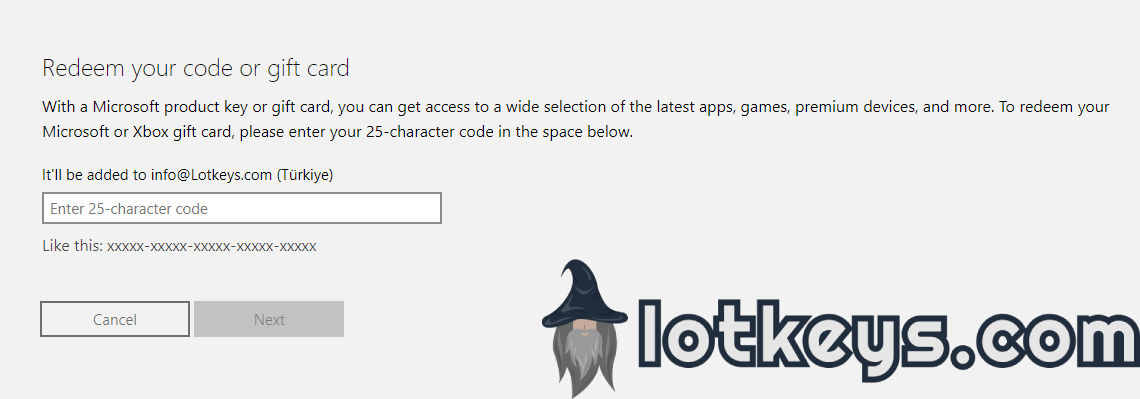
From any device (PC, tablet, or mobile), visit redeem.microsoft.com.
Sign in using your Microsoft account linked to your Xbox.
On the redeem page, enter or paste your 25-character key.
Click the Next button, review the product details, and confirm redemption.
Your redeemed game, points, or subscription will automatically sync to your Xbox console the next time you sign in.
Extra Tip: Online redemption is quick and convenient no console needed. It’s perfect if you’re gifting a digital key to a friend or setting up a new console remotely.
Products from authorized providers at fair prices.
24-Hour Nonstop and Fast Delivery Service.
24/7 Support Center
100% Satisfaction Guaranteed
Microsoft Flight Simulator 2024 - Simverse Coins (Xbox) Comments